 DogMate by KalisPro
A counting channel on Discord
Counting is the simplest game a server can have, and one of the most addictive: everyone posts the next number, and one mistake ends the run. DogMate checks every number, marks it with ✅, celebrates new records and decides what happens after a mistake.
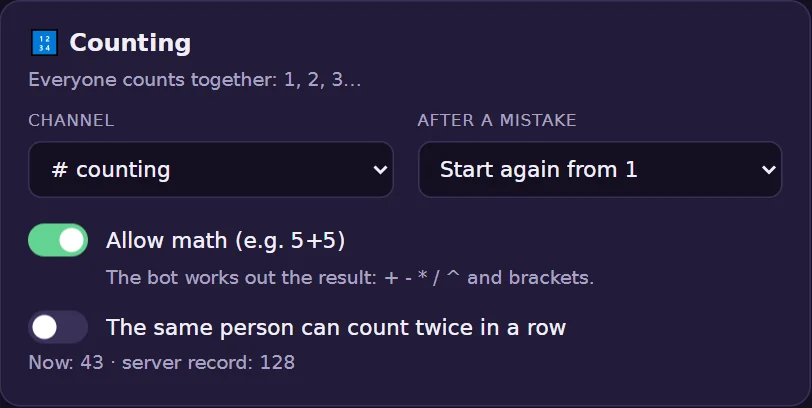
Step by step
- Create a channel. For example
#counting. It's worth turning on slow mode for a few seconds, so two people don't post the same number at once. - Pick it in Fun channels. In the dashboard open DogMate, Fun channels, switch the module on and choose the channel in the Counting card.
- Choose what happens after a mistake. Start again from 1: the wrong number gets ❌ and the bot announces who broke the run and the server record. Delete the wrong number and carry on: the bot deletes it and shows for a moment which number comes next.
- Turn math on or off. With "Allow math",
40+3or(10-2)*5counts as the result. The bot understands + - * / ^ and brackets, and the result has to be a whole number. - Decide about counting twice. By default one person can't post two numbers in a row. Switch "The same person can count twice in a row" on for a small server.
What members see
- ✅ under every correct number, 🏆 under a number that beats the server record (from 10 up),
- text after the number is fine:
42 halfway therestill counts as 42, - a message without a number is deleted with a short hint, so the channel stays clean.
The dashboard shows the current number and the server record under the Counting card.
Common problems
The bot ignores numbers
Counting needs the Message Content intent, and the bot needs to see the channel, add reactions and manage messages there.
A deleted number broke the count
The bot counts by what it accepted, not by what is in the channel. If someone deletes their number, the next one is still the one after it.