 DogMate by KalisPro
Fun channels on Discord, looked after by a bot
A channel where members count together, vote on ideas or post only pictures is fun until someone breaks the rules. DogMate keeps them for you: it turns suggestions into voting cards, checks every number and word, adds a watermark to pictures and quietly deletes what does not fit. Free, set up in a few minutes.
What you need
- DogMate on your server and the Manage Server permission,
- one channel per game, for example
#suggestions,#countingand#pictures, - the Message Content intent switched on for the bot (it is on for the public DogMate). Counting, last letter, one-word story and emoji only read the text of messages.
Step by step
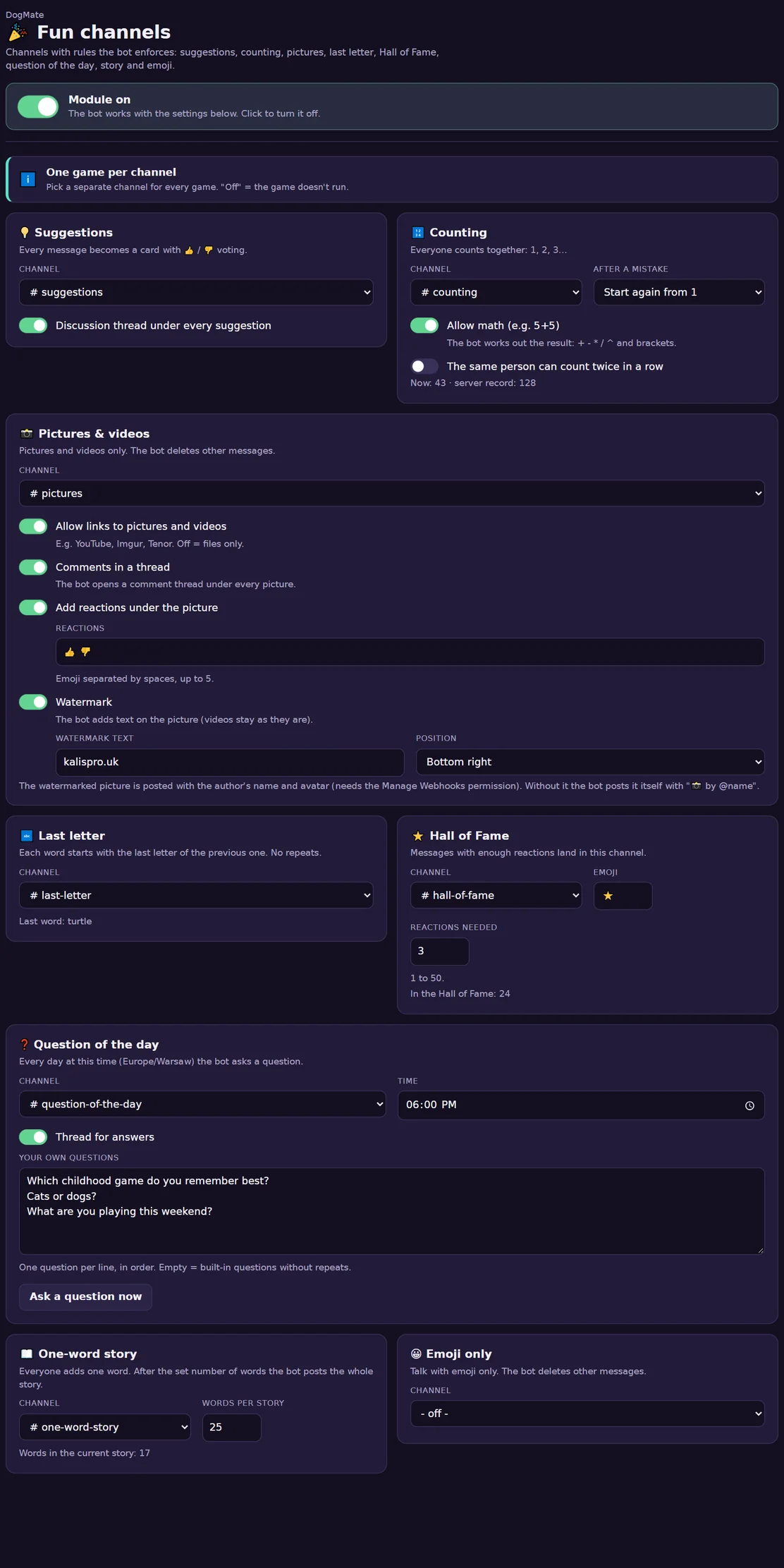
- Open Fun channels. Log in at panel.kalispro.uk, choose your server and open DogMate, Fun channels. Switch the module on.
- Create a channel for each game. Every game needs a channel of its own, otherwise the bot would delete the other game's messages. The dashboard won't save two games on one channel.
- Pick the channels. Each game has its own card with a channel list. A game without a channel stays off, so you can start with just one.
- Set the options. What happens after a mistake in counting, links and comments for pictures, the watermark, the Hall of Fame emoji and the question time. Click Save at the bottom.
- Check the permissions. If the bot is missing something on a channel, the dashboard shows it next to the channel with an Add permissions button.
The eight games
💡 Suggestions
Every message becomes a card with the author, the text and 👍 and 👎 to vote. With "Discussion thread" on, each suggestion gets its own thread, so the channel stays a clean list of ideas.
🔢 Counting
Members count 1, 2, 3… together. A correct number gets ✅, a new server record 🏆. After a mistake the bot either starts again from 1 or only deletes the wrong number, you choose. More in the counting guide.
📸 Pictures and videos
Only pictures and videos stay, optionally also links (YouTube, Imgur, Tenor, Twitch clips, TikTok). The bot can add reactions, open a comment thread under each picture and put a watermark on it. More in the pictures guide.
🔤 Last letter
One word per message, starting with the last letter of the previous word. The same person can't go twice in a row and a word can't come back (the bot remembers the last 1000). A wrong word disappears with a short hint.
⭐ Hall of Fame
When a message anywhere on the server gets enough reactions (⭐ and 3 by default, both can be changed), the bot copies it with the author, picture and a jump link to the Hall of Fame channel. The counter under it keeps updating.
❓ Question of the day
Every day at your time the bot asks a question. Write your own list (one per line, asked in order) or leave it empty for built-in questions without repeats. "Thread for answers" keeps replies together. Ask a question now sends one straight away to test it.
📖 One-word story
Everyone adds one word. After the number of words you set (25 by default) the bot posts the whole story and a new one starts.
😀 Emoji only
Emoji, including your server's own, and nothing else. Messages with text are deleted.
Common problems
The bot doesn't react to numbers or words
Check that the module is on, the game has a channel and the bot can see it, send messages, add reactions and manage messages there.
Hints after deleted messages disappear
That's on purpose: a hint stays for a few seconds so the game channel doesn't fill up with bot messages.