 DogMate by KalisPro
A pictures channel with a watermark on Discord
A channel for screenshots, art or memes works best when it stays a gallery. DogMate deletes messages without a picture or video, adds reactions under every post, can open a thread for comments and puts your watermark, kalispro.uk by default, on every picture.

Step by step
- Create a channel. For example
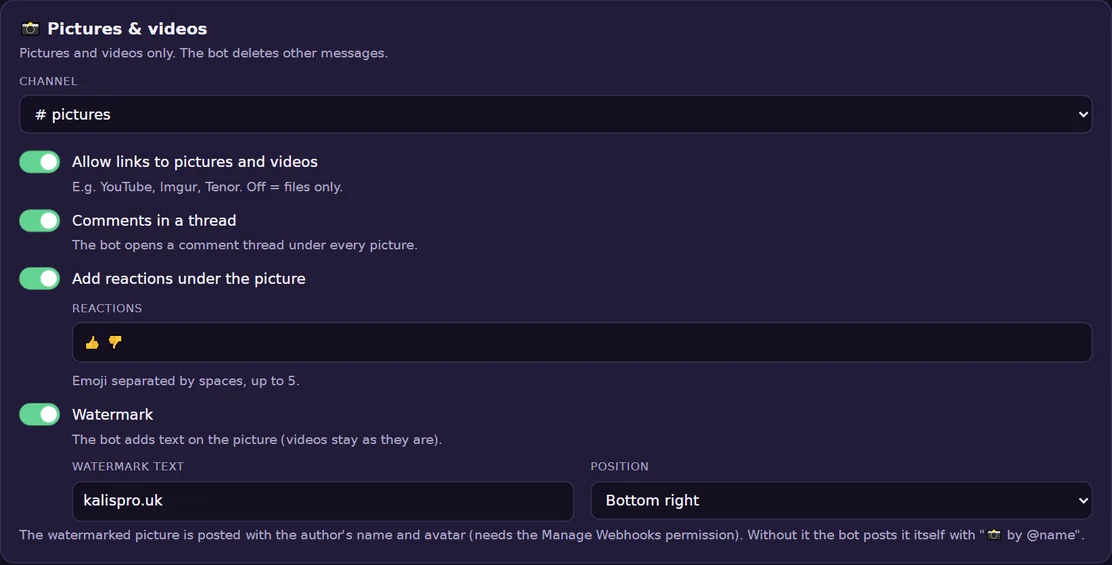
#pictures. - Pick it in Fun channels. In the dashboard open DogMate, Fun channels, switch the module on and choose the channel in Pictures and videos.
- Choose links and comments. "Allow links" also accepts links to pictures and videos and to YouTube, Imgur, Tenor, Giphy, Streamable, Twitch clips and TikTok. Off means files only. "Comments in a thread" opens a thread under every post, so talk doesn't push pictures away.
- Set the reactions. 👍 and 👎 by default. Type up to five emoji separated by spaces, for example
🔥 😂 ❤️, or switch reactions off. - Set the watermark. Switch it on, type your text (up to 40 characters,
kalispro.ukby default) and pick where it goes: a corner or the center.
How the watermark works
The bot downloads the picture, adds the text with a soft shadow so it reads on light and dark pictures, deletes the original and posts the new one. PNG, JPG and WebP get a watermark. Videos and GIFs stay as they were.
The new post keeps the author's name and avatar: DogMate posts it through a webhook. For that it needs the Manage Webhooks permission. Without it the bot posts the picture itself with "📸 by @name" above it.
Common problems
Pictures come without the watermark
Check that the watermark is on and the file is a PNG, JPG or WebP under 9 MB. Bigger files stay untouched.
Reactions don't appear
The bot needs Add Reactions on the channel. A server emoji works only if it's from your server.